



Wednesday, July 5, 2006
By: Matthew Doucette
WinRAR is a file compressor / archiver great for backing up data. Download WinRAR at rarlab.com/download.htm.
WinRAR Tip #1: Change Default Settings:
Follow these steps:
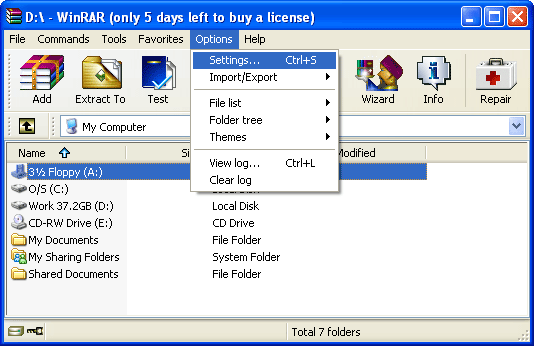
Open WinRAR, click "Options" menu, and click "Settings...":
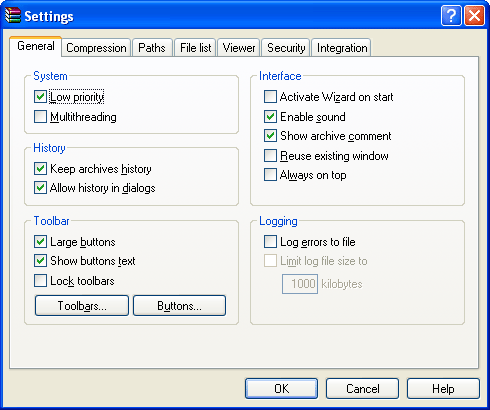
This brings you to the "Settings" window in the "General" tab:
Click the "Compression" tab:
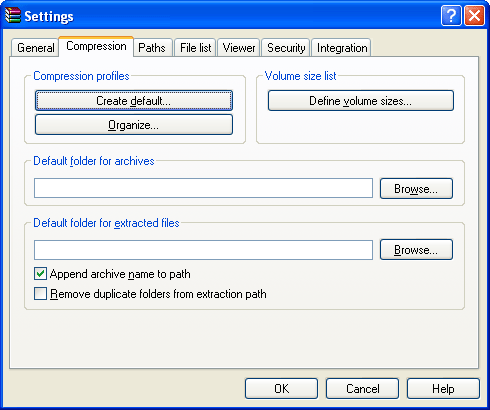
In the "Compression profiles" section, click "Create default..." to bring up the "Set default compression options" window:
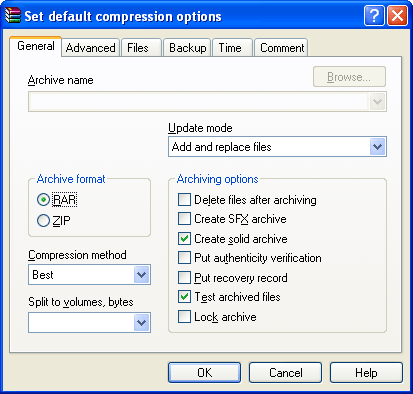
Now, anything you change in here will be your default settings. For example, if you wish to use "Best" compression, "Create solid archive", and "Test archived files" by default (as I have chosen in the screenshot above), then click these as you would if you were about to create an archive.
Setting a Default Password:
You can even set a default password, by following these steps:
Go to the "Set default compression options" window again, and click the "Advanced" tab:

Click the "Set password..." button to bring up the "Archiving with password" window:
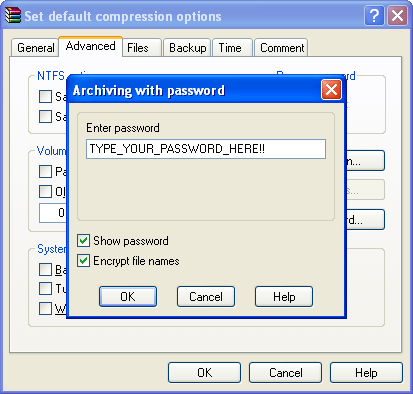
Set your password, click "OK" when you are finished with each window.
Be warned that having a default password stores it in your profile, which is a security risk. It allows anyone who sits at your computer to open RAR files without knowing your password, as it is automatically used by default for both opening archives as well as creating archives. I recommend not setting a password by default, unless you are aware of the consequences.
All WinRAR Tips:
- WinRAR Tip #1: Change Default Settings
- WinRAR Tip #2: Automatically Test Archived Files
- WinRAR Tip #3: Delete Multiple Files out of Multiple RAR Files
- WinRAR Tip #4: Run in Low Priority
- WinRAR Tip #5: Run with Multi-Threading
- WinRAR Tip #6: Make Additional WinRAR Copies Wait Their Turn
- WinRAR Tip #7: Batch File Backups
Have Any Tips To Add?
If you have WinRAR tips you would like to add, please contact us.
Also See:
External Links:
- RARLAB (the makers of WinRAR)
- WinRAR (Wikipedia)
- RAR (file format) (Wikipedia)
- Maximum Compression (shows maximum achievable compression ratio of 150+ compression programs )
- WinRAR (the company) (official publisher of RARLAB products, including WinRAR)
About the Author: I am Matthew Doucette of Xona Games, an award-winning indie game studio that I founded with my twin brother. We make intensified arcade-style retro games. Our business, our games, our technology, and we as competitive gamers have won prestigious awards and received worldwide press. Our business has won $190,000 in contests. Our games have ranked from #1 in Canada to #1 in Japan, have become #1 best sellers in multiple countries, have won game contests, and have held 3 of the top 5 rated spots in Japan of all Xbox LIVE indie games. Our game engines have been awarded for technical excellence. And we, the developers, have placed #1 in competitive gaming competitions -- relating to the games we make. Read about our story, our awards, our games, and view our blog.